
An online event registration form that collects payments needs three things joined together: the questions you ask, a checkout, and a ticket issued only once the payment is confirmed. If those parts live in separate tools, someone ends up matching payments to names by hand. Here is what to ask, what to leave out, and how to test it.
Why a plain form is not enough
A form records what someone typed. It does not prove they paid.
Say you collect names on a form and ask people to send mobile money to a number. You now have two lists, and they do not match. Someone paid from a spouse’s phone. Someone sent less than the price. Someone sent a screenshot from last month. All of this lands on you in the final week.
Google Forms is a good example of the limit. As read on 30 October 2026, its product page describes question types and charts of responses and does not mention payments, and its pages do not describe tickets or check-in. It is a good tool for a sign-up list with no money involved. Our comparison with Google Forms has the details.
A registration flow does more. The person’s details, their payment and their ticket all belong to one order. You can see who has paid and who hasn’t without asking anybody.
Ask for less than you think
Every question is another place where someone can give up on a slow connection. Before you add one, ask: what will I do with this answer? If you cannot say, leave it out.
Here is a starting point by event type:
| Event | Worth asking | Usually skip |
|---|---|---|
| Run or walk | Ticket type, shirt size, emergency contact | Occupation, home address |
| Conference | Organization, job title, access needs | Date of birth |
| Workshop | Experience level, what they want to learn | Next of kin |
| Camp | Age, allergies, parent’s contact | Anything you won’t read |
| Concert | Nothing beyond the basics | Almost everything |
On Laces, name, phone and email are always asked. Gender, age group and the emergency contact are switches you can turn off, and you can add your own questions. You read the answers on each order in the app.
Get the contact details right
Email is the most important field. On Laces the ticket travels by email and on the participant’s order page, not by SMS or WhatsApp. A mistyped address means no ticket arrives, and nobody is told that it bounced.
That is why the Laces form asks for the email twice. The second field costs a few seconds and prevents the most common way a registration goes wrong. Phone numbers are checked as well, against real network prefixes in Uganda.
Be careful with sensitive information
Medical details, children’s details and ID numbers deserve a deliberate decision.
- Ask for medical information only if your medical team will use it on the day.
- Limit who can see the answers. On Laces, registration answers are visible only to the people you trust with them.
- Do not publish attendee lists or phone numbers, or hand them to a sponsor without asking people first.
- If children will attend, plan parental consent and safeguarding with whoever is responsible for them.
Uganda’s Data Protection and Privacy Act 2019 applies to what you collect. The organizer duties are set out in the Laces Organizer Terms.
Set up ticket types and limits
Tickets are where a form becomes something people can buy.
- Offer one ticket type for each real choice: a distance, Regular and VIP, or a student rate.
- Set a number of places where the limit is real: seats, shirts or meals. Leave it empty if the event is uncapped.
- Say what each ticket includes. “VIP” means nothing without that.
- Plan for groups. A person can buy several tickets in one order and give each attendee’s details, so one person can pay for a team.
Laces does not raise a price on a date by itself. If you want a lower first price, create a separate ticket type, name it clearly, and give it a limited number of places.
A free ticket is fine too. A price of zero carries no fee at all, so a free event costs nothing to you or your guests.
Make the final price obvious
People abandon a form when the total surprises them. On Laces the checkout page shows the ticket price and the Laces Service Fee as separate lines before anyone enters a PIN. The fee goes on top of your price and the participant pays it, so your ticket price reaches you whole. Uganda’s rates are published.
Tell people what happens after they pay. On Laces they see an order code on screen, then a ticket with a QR code arrives by email. Our participant guide shows every step, and you can send it to anyone who is unsure.
Collecting registration fees without a website
If your real goal is to collect registration fees online, you don’t need a site to host the form. A hosted event page holds the questions and the checkout together, so all you share is one link. Laces gives each event a link and a QR code that you can put in a chat, on a poster or on an existing page. Our guide to selling tickets without a website walks through setting one up.
Three rules keep fee collection clean, whichever tool you use:
- Trust the confirmed status, not a screenshot. A screenshot can be old, cropped or forwarded. An entry should count as paid only when the payment itself is confirmed, and a Laces ticket comes after that point.
- Never ask for a PIN or a one-time code in a form. A real prompt arrives on the payer’s own phone, and they approve it there. Tell people plainly that nobody on your team will ever ask for one.
- Reconcile against your list, not your wallet. Your paid participant list should explain your earnings. If you also took money outside the checkout, such as cash, keep it on a separate signed list, because Laces doesn’t record cash.
How people pay depends on the country: MTN MoMo, Airtel Money and cards in Uganda; M-Pesa and Airtel Money in Kenya; MTN MoMo, Telecel Cash and AT Money in Ghana; MTN MoMo and Airtel Money in Rwanda; MTN MoMo, Airtel Money and Zamtel Kwacha in Zambia. Bear in mind that a confirmed payment isn’t always money you can withdraw straight away, so check your country’s pricing page before you promise a supplier a date.
Test it before you promote it
Do this on a real phone, on mobile data, before the link goes out:
- Open the link from WhatsApp, the way your participants will.
- Fill in the form with your thumb. Note any question that feels slow or confusing.
- Check that the total matches what your poster says.
- Buy a low-priced ticket and approve the payment.
- Find the ticket email. Check the spam folder too.
- Open your list in the app and see whether your order appears.
- Try a wrong email or an incomplete number to see the error messages.
Step 4 needs your organization to be cleared for payments first, because an uncleared page can be viewed but not paid on. The getting started guide explains what to prepare.
Watch what happens after launch
The first day of sales will show you where the form is failing.
- Many started orders but few paid ones? Check whether your price or a long list of questions is the problem.
- The same question keeps coming on WhatsApp? Add the answer to your event page.
- A question nobody answers usefully? Remove it.
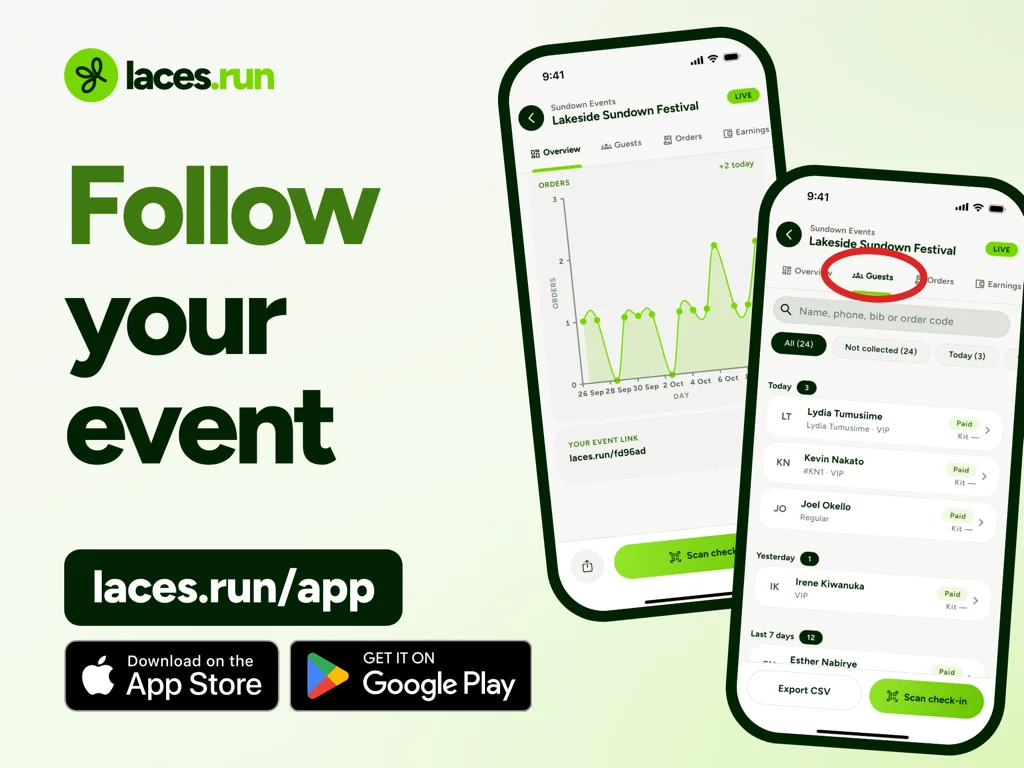
You can watch registrations and sales come in live from the app, and download your orders as CSV, Excel or PDF, and your paid participant list as CSV when your team needs them. Owners and admins also get the answers to your questions in that participant file.
Frequently asked questions
How can I collect registration fees online without a website?
Use a hosted event page. On Laces, you create the event in the app and share its link or QR code, and each person registers and pays on that page.
Can Google Forms collect event payments?
Its product page does not mention payments as of 30 October 2026. You would need a separate way to take money and match it to each response.
Should every question be required?
No. Require only what you need in order to run the event. Optional questions still add length, so keep those few too.
Do participants need an app or an account?
No. On Laces they register and pay from a link in their browser. Only the organizer uses the app.
Can I change questions after the event goes live?
Yes, you can add questions from the app after creating the event. People who have already registered will not have answered a new question, so collect those answers another way.
Turn your questions into a registration page
Create your event, add your tickets and questions, and share one link. It is free for organizers.
Read next
 For organizersEvent Registration Database: What Organizers Need to TrackThere is no public Laces database. See what an event registration database should track, what organizers get in the app, and how attendee data stays private.5 Nov 2026 · 8 min read
 For organizersEvent Payment Links in Africa: Collect Registrations Without Manual TransfersA pay link collects money. An event checkout also records who paid, for which ticket, and sends a ticket. How to choose, and what to check on payouts.5 Nov 2026 · 7 min read
 For organizersHow to Sell Event Tickets Online in 2027 Without a WebsiteHow to sell event tickets online in 2027 with no website: a hosted event page, one link to share, a test purchase, and when your own site still makes sense.5 Nov 2026 · 8 min read


